10 minutes
Hunting Without a Budget - Chasing Banking Phishing Kits with Free Tools
Introduction
This research started from a Group-IB blogpost that unveils a spreading campaign. It looks like plain information stealing, but through a series of cumulative, apparently “legitimate” requests, the attackers harvest all the data needed to fully compromise the victim’s card and identity. That data can then potentially be sold to other groups, in order to overcome KYC and the other countermeasures already deployed on the defense side.
After reading that blogpost, as always happens, I started questioning myself: “As a single researcher, is it possible to keep up with those guys, or are expensive intelligence platforms the only way to go if you want to make an impact?” A very similar question came up last year in a previous blogpost. This time, however, the question is more about the attacker’s infrastructure, and about discovering threats ahead of time, or where no one’s lookin’.
💡”Where no one’s lookin’" is provocative: once a piece of information is listed somewhere, it means that someone has already tracked it. However, most of the time scans are part of broader operations that run automatically, and some infrastructure may not reach the threshold for triggering an alert. In this blogpost I will focus on tracking the attacker’s infrastructure. I would like to show a technique, among others, to keep up (or at least try to) with attackers. More specifically, my goal is to “narrow” the gap for people who do not have full access to expensive intelligence platforms.
Information Gathering
Every investigation needs an entry point. In this case we can start from our reference article and keep the information that could be useful to expand our hunting query. A good place to start are the IOCs (ça va sans dire): they show how the attackers build their infrastructure, especially their favorite naming conventions and TLDs, and exploring those lists gives us a good insight into where to begin.
Here it’s possible to split every domain into its keywords and counted how many registered domains contain each term:
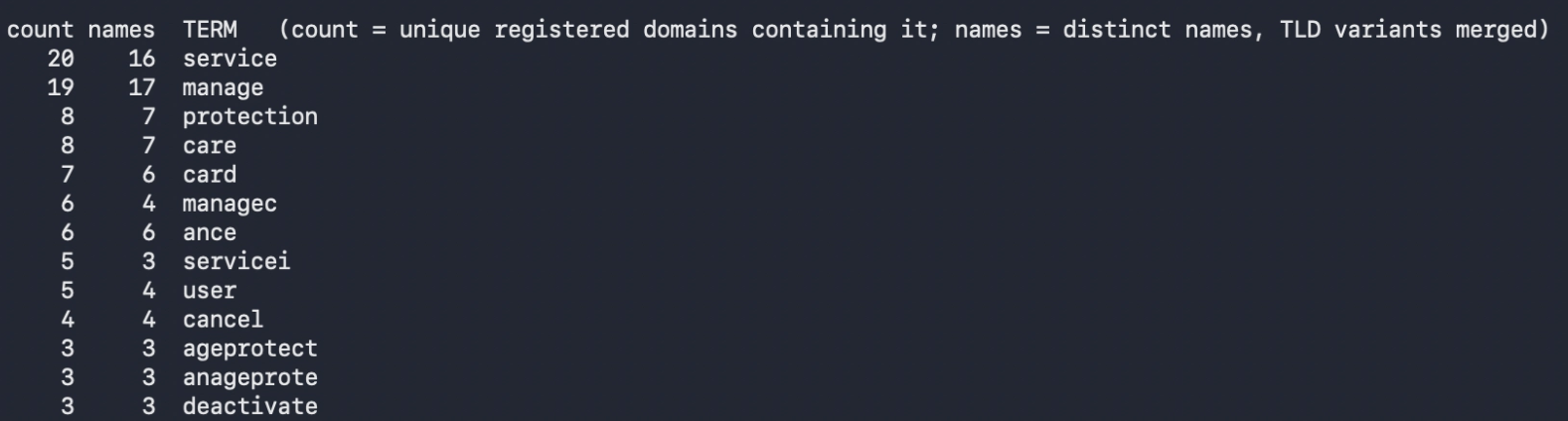 Figure 1: Keyword Frequency
TLDs are much easier, since we can sum most of them up in three categories: .in, .online and github.io.
However, that was just a starting point. From here we can explore the IOCs a bit more, to understand what the websites look like and to extract additional words and custom elements created to lure people into submitting their credentials.
Let’s take cancelcardprotection[.]online as a starting point. It contains two keywords that appear at the top of our counter: protection and card. Let’s explore this site on urlscan.io.
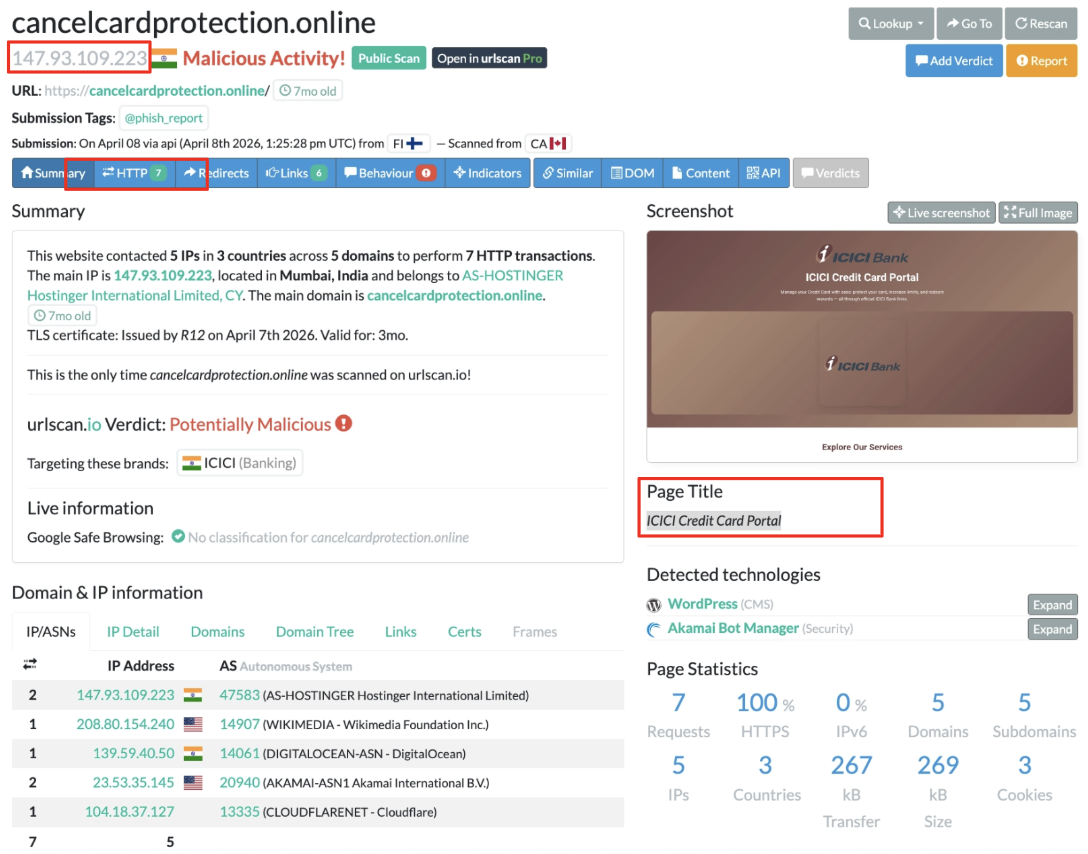
Figure 2: URLScan - ICICIBank phishing page
This page contains a lot of great information: the IP associated with the site, the resources collected, the certificates (from time to time, searching for the associated CommonName can reveal a lot) and the page title.
Even if the site is not available anymore, we can switch to the HTTP tab and see the resources urlscan.io collected at scan time. From here we can figure out whether there is something interesting to catch.
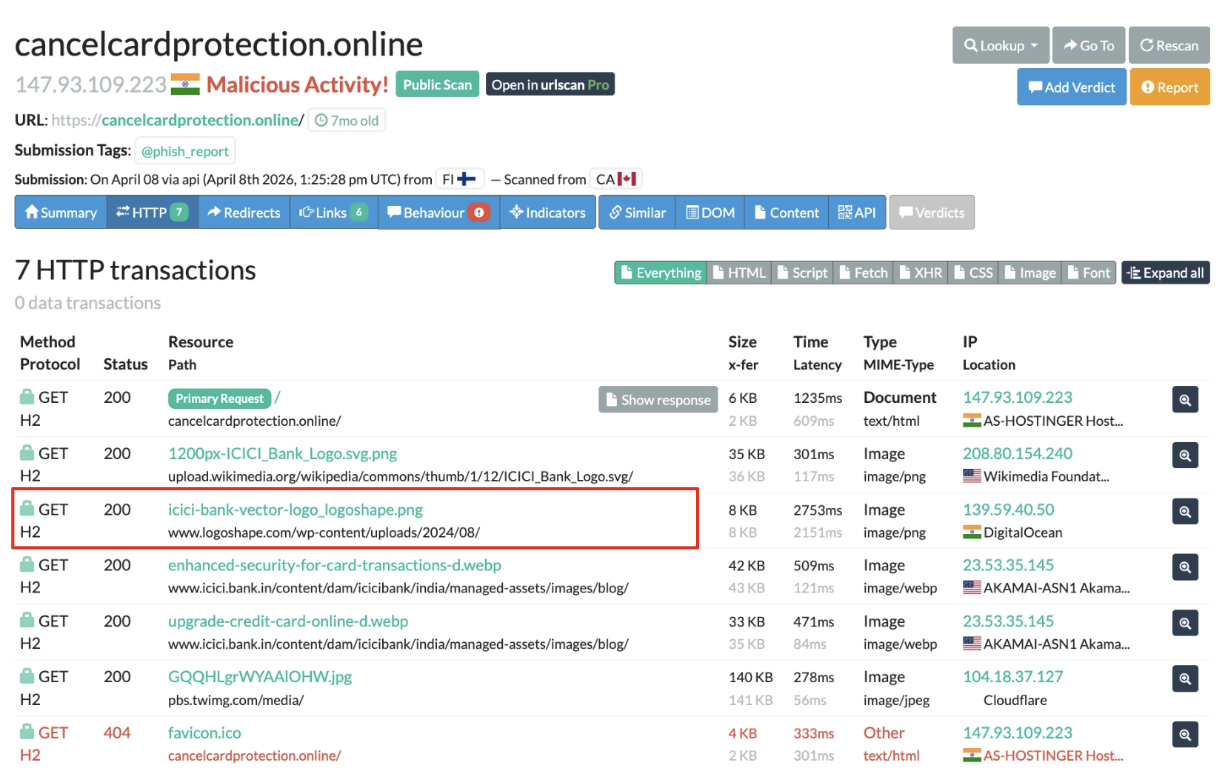 Figure 3: URLScan - ICICIBank phishing page detial
One of the most interesting catches is the .png called icici-bank-vector-logo_logoshape.png. Expanding the tab for that resource, we get the hash value associated with it (to get more details about the actual image, we can go directly on Show image). Another arrow for our bow.
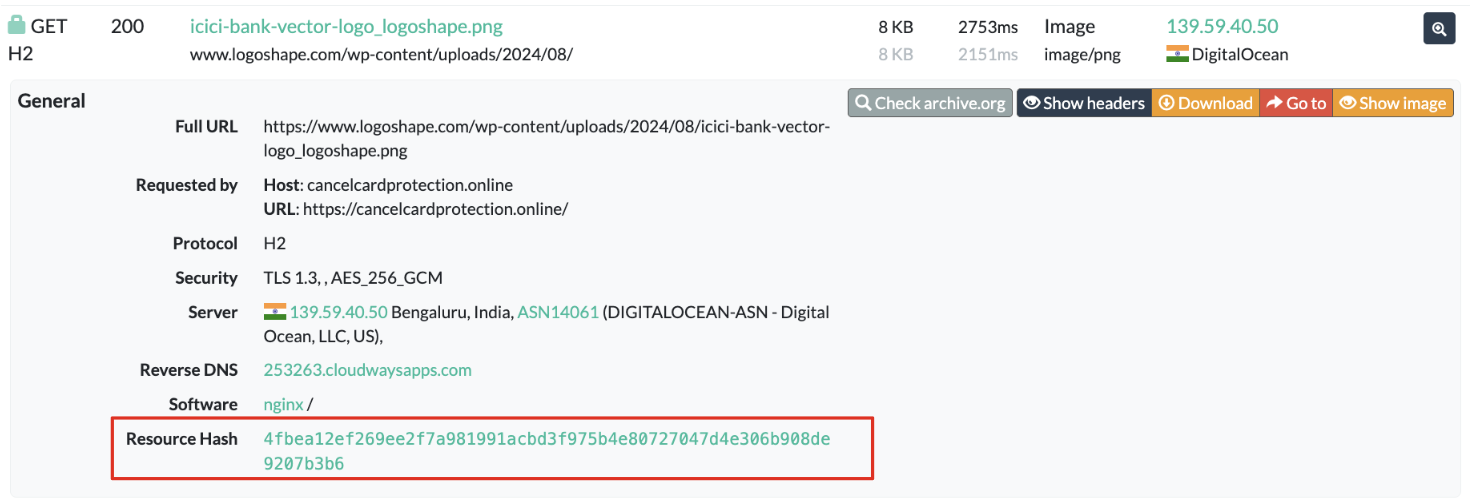 Figure 4: URLScan - ICICIBank phishing page resources
💡The idea behind this information gathering is to “understand” the attacker’s mind a little bit better. This is a very useful skill that can be re-used in different cybersecurity areas: understanding the attacker a little better pays off with dividends whether you are reversing binaries, responding to an incident or pentesting the attacker’s infrastructure.
Starting the Hunt
From here we can follow different strategies. Let’s start from the easy one before moving forward to complex queries.
The very first query is quite easy. It just takes the hash of the .png file discovered in the previous section and uses it as a first pivot:
hash:4fbea12ef269ee2f7a981991acbd3f975b4e80727047d4e306b908de9207b3b6
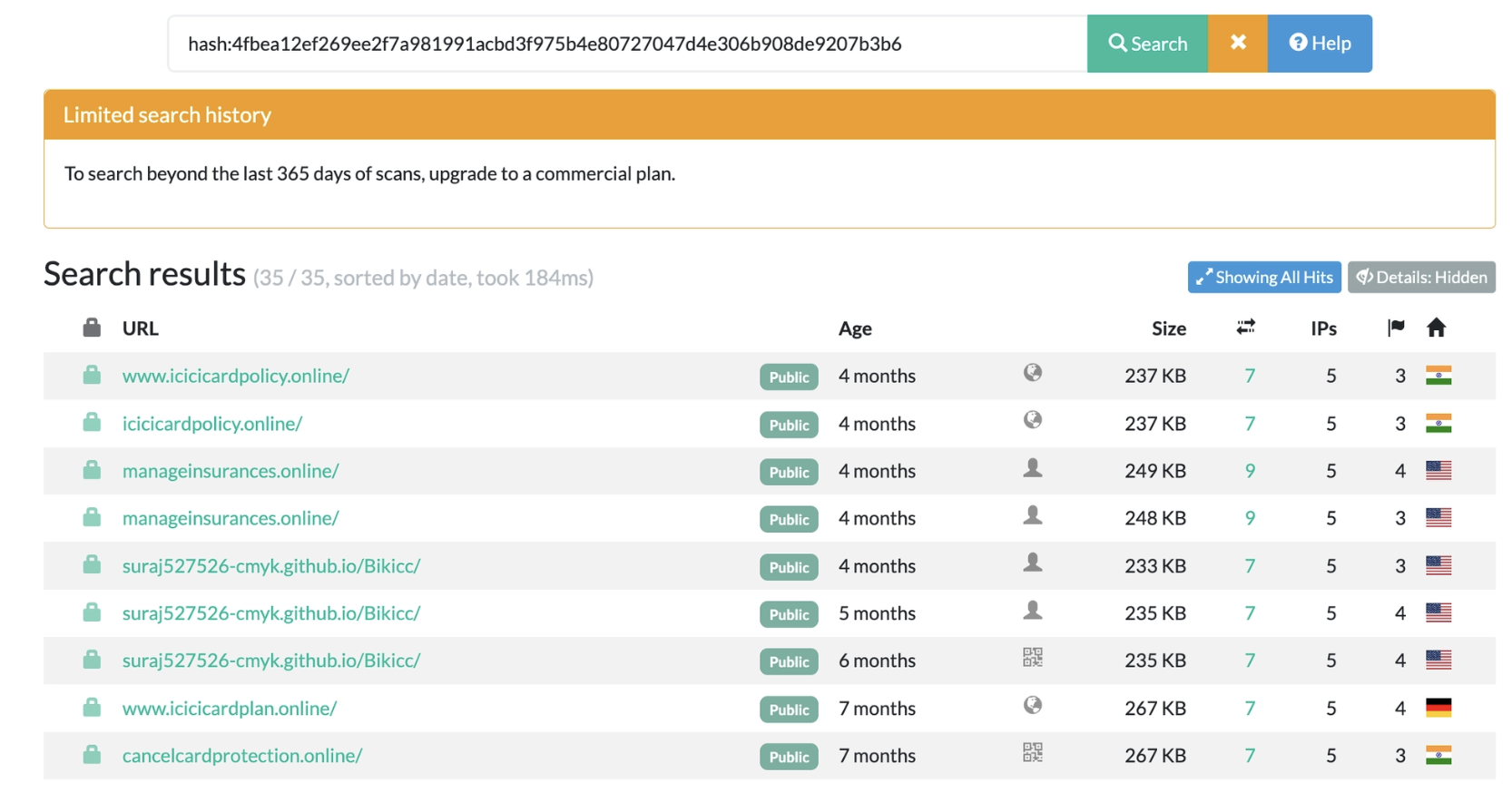 Figure 5: URLScan - Hash query result
At the time of writing, this query collected 24 distinct results. Of those, 15 domains were already part of the original Group-IB list, while 9 were not tracked there.
💡This information might seem irrelevant, since our purpose was to find additional targets instead of duplicating existing ones. However, when we are trying to discover new things, especially from a known starting point (as in this case), re-collecting known information is a strong signal that our query is properly aligned with our focus.
Another query that comes to mind is to use the page.title indicator directly:
page.title:"ICICI Credit Card Portal"
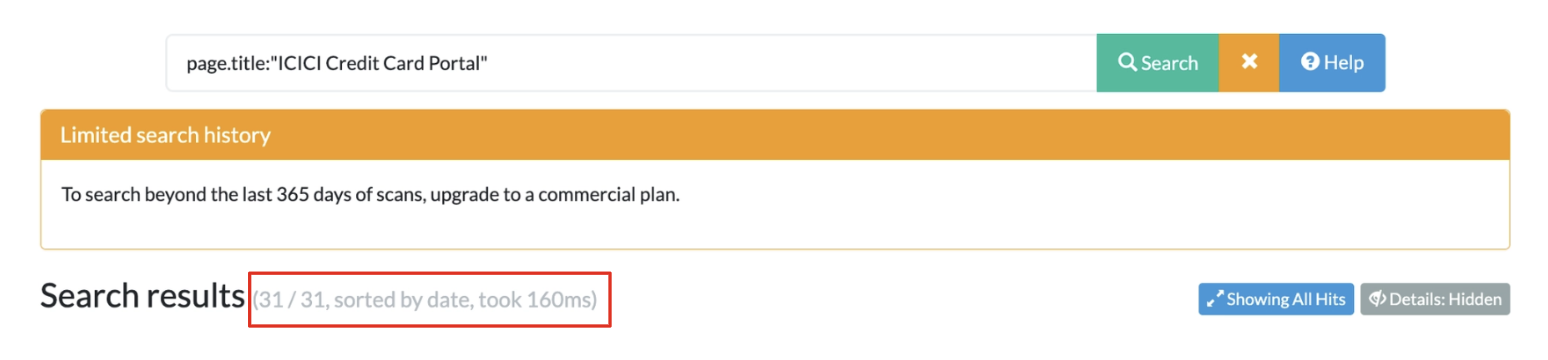 Figure 6: URLScan - Page Title query result
This time we get back 31 results, and a couple of URLs did not appear anywhere else (see the IOCs section). Both queries returned interesting results, but we have still not used our initial word-frequency score.
Taking a Step Further and Exploring the Unknown
From here, it’s worth noting that we are dealing with information related to the previous campaign, or that could be caught by a collateral query derived from what we learned during the Group-IB investigation. Either way, a query built on what we have observed so far is a great way to start tracking phishing infrastructure that aims to steal card or banking information.
Let’s create a query that combines our previous words in a way that catches as much of the observed information as possible. For instance, it is possible to exploit domain keywords as well as keywords we found in the URLs. A reasonable query could be the following:
page.domain:/.*(manage|cpplan|mobile|service|secure|help).*\.(online|in)/ AND
page.url.keyword:/.*(card|payment).*/ AND
stats.encodedDataLength:[100000 TO 500000]
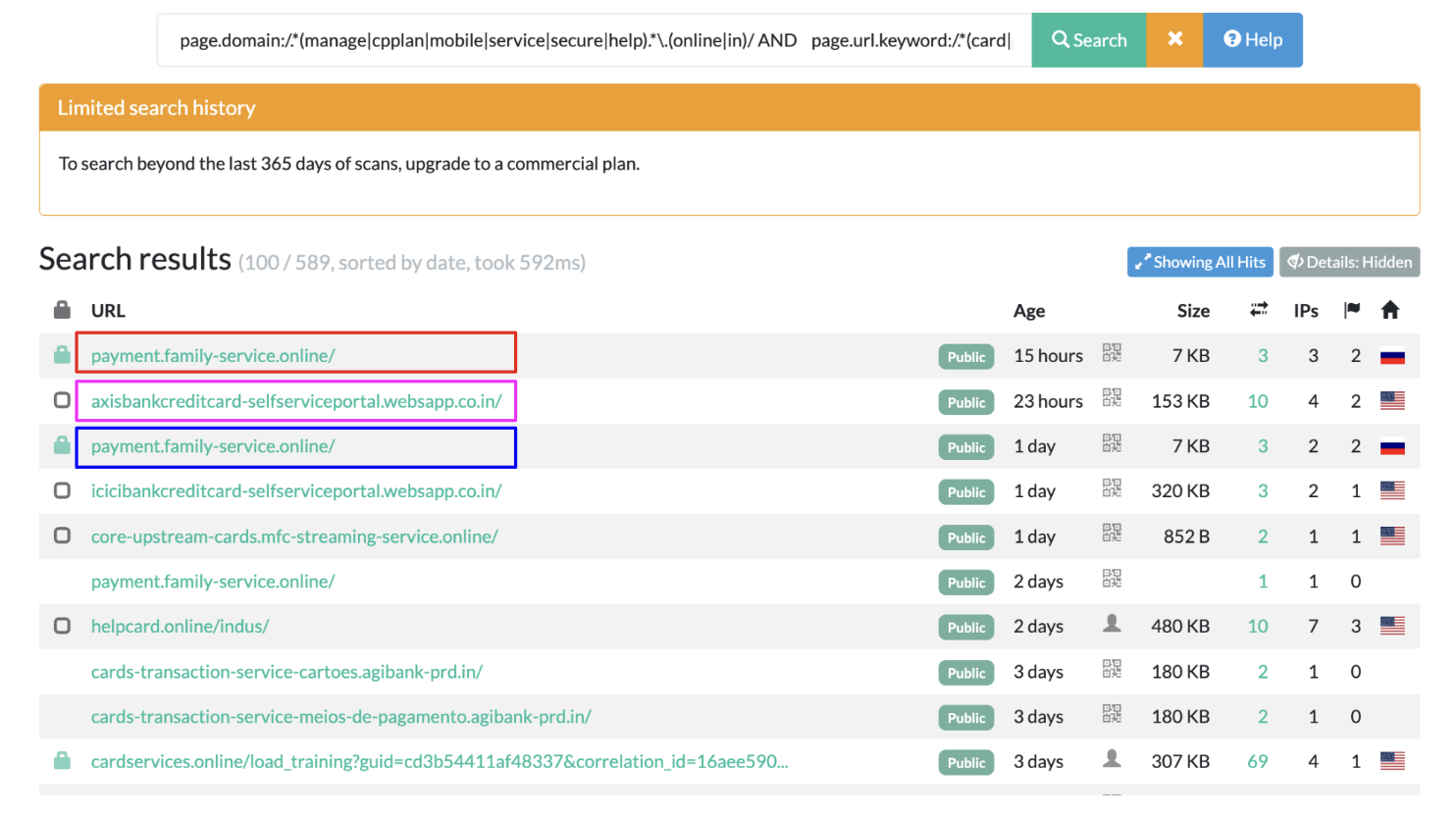 Figure 7: URLScan - Keyword query result
Now we have a bunch of results to investigate. To understand whether our query worked, let’s explore a few of them. The first one worth highlighting is icicibankcreditcard-selfserviceportal[.]websapp[.]co[.]in. Given the naming convention, it seems related to the icicibank theme we have observed so far. Moreover, it contains quite a lot of data (320KB), and the most interesting thing is that it was discovered a day ago, so it’s possible that the site is still up and running.
Exploring the associated card, we can see the IP address and a preview of the actual domain. In this case the page title is “Render - Application loading”. If we search for the Render service, we find this:
“On the Render cloud platform, free tier web services automatically spin down after 15 minutes of inactivity to save resources. When a user next visits the site, the service takes about 1 minute to wake back up, and Render shows an automatic loading/spin-up page to the browser during this time”
So URLScan probably started analyzing this domain while it was still in its bootstrap phase.
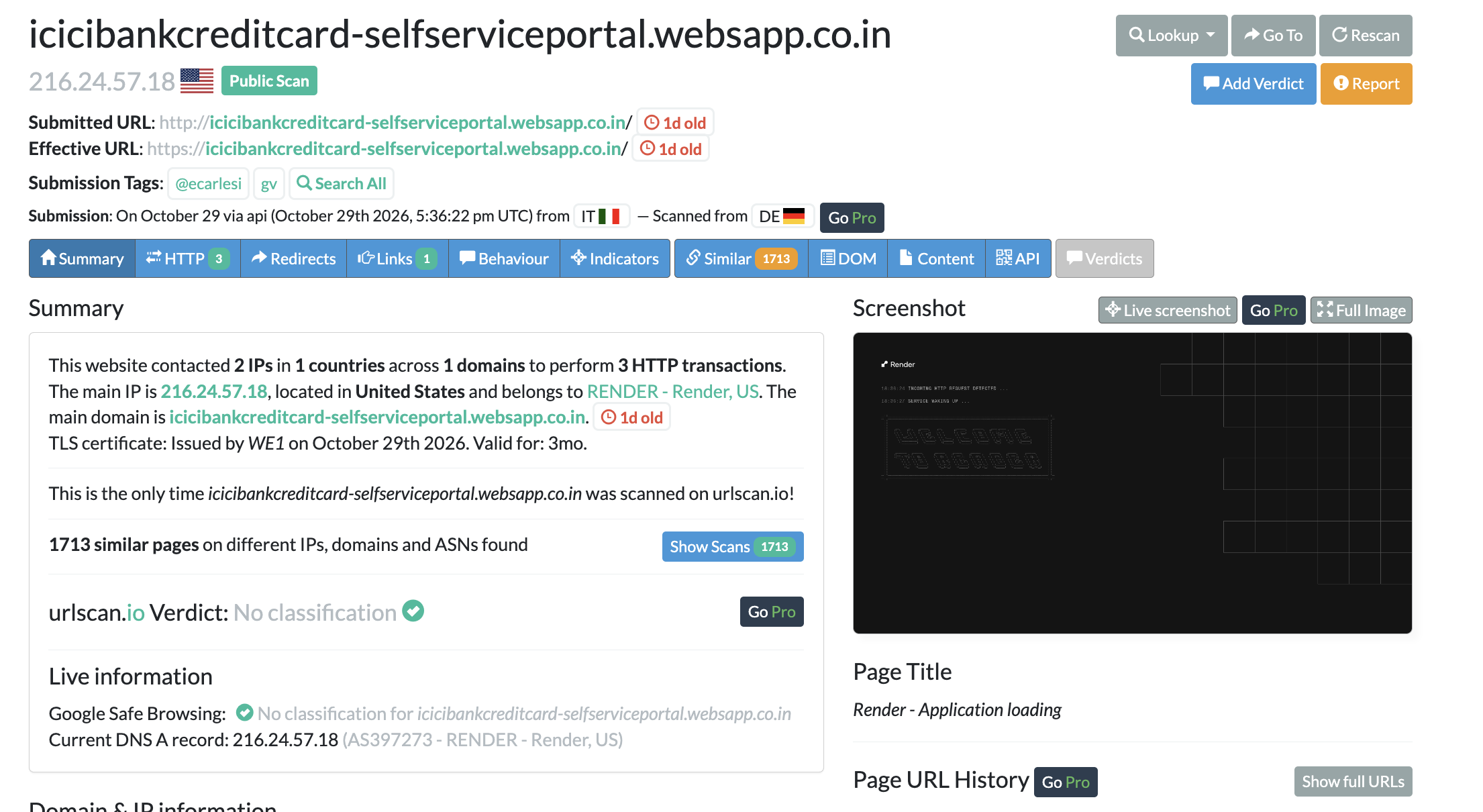 Figure 8: URLScan - ICICI new fake portal detail
Let’s explore the site and see what is actually behind it.
The main page is promising, especially the claims about mobile device recommendations. Navigating through the “Mobile Simulator”, we can spot other pages related to Card Activation, Rewards Redemptions, Pin Generation, etc. Regardless of the desired function, the user is redirected to the Application Detail view, which asks for KYC information, as well as card info and an OTP.
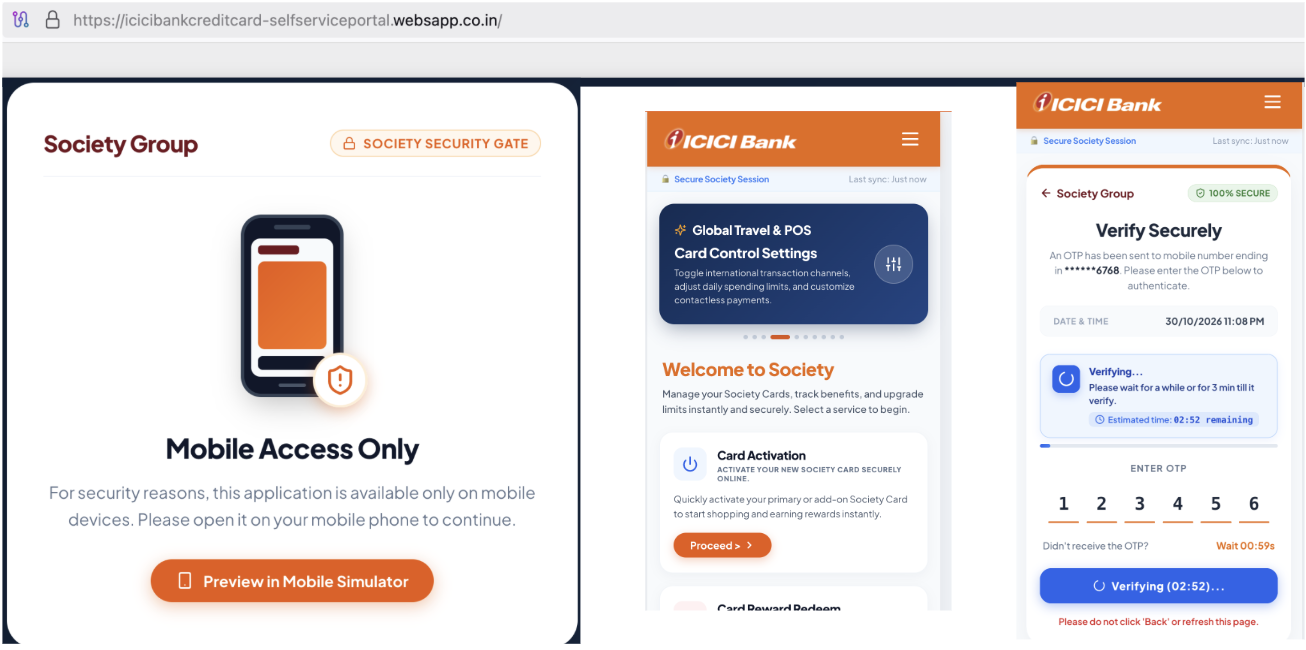 Figure 9: Live ICICI new fake portal
As an additional recon step, to understand whether this domain has already been used somewhere, we can go directly on VirusTotal and search for traces. At the time of writing the domain is not flagged as malicious, but we also get some additional CNAMEs that could be used to reach the site.
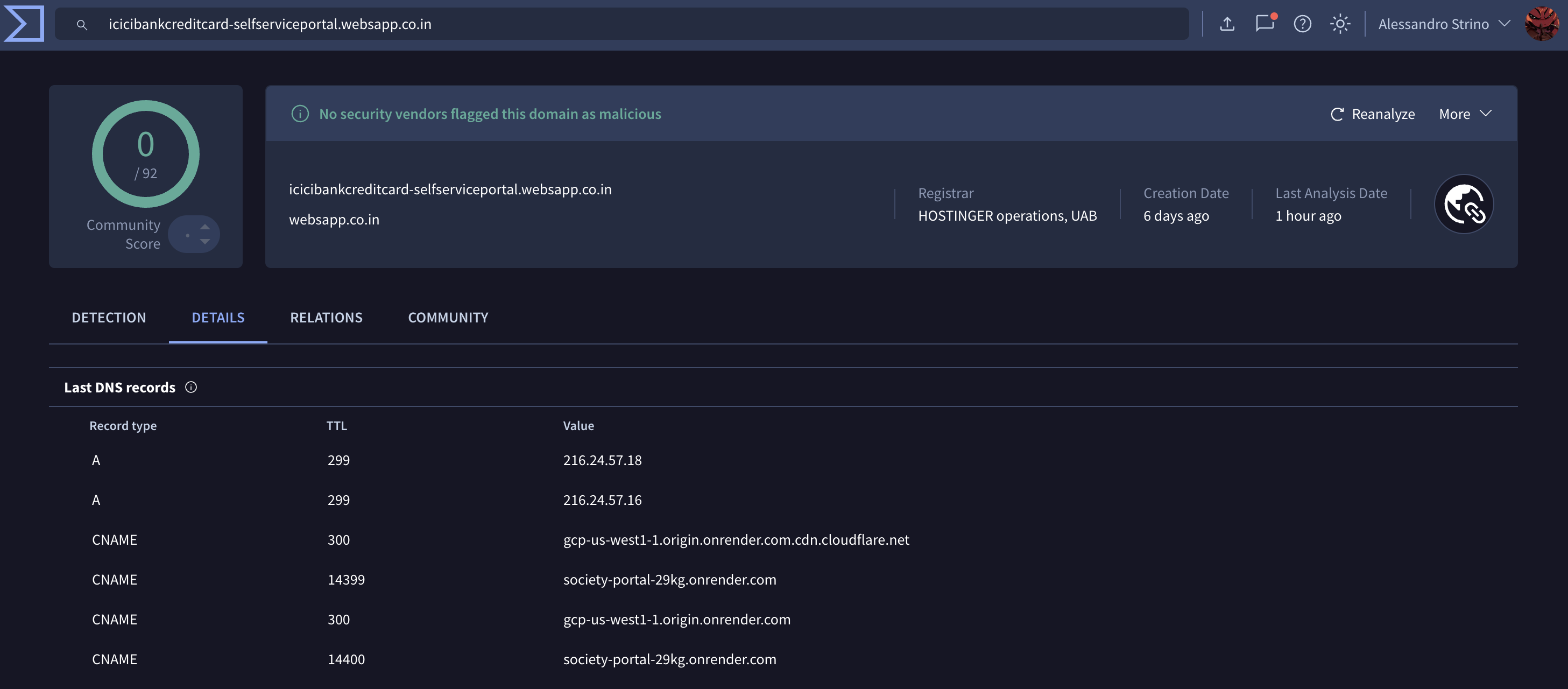 Figure 10: VirustTotal domain verification
From here we have additional options to follow, especially if we want to investigate more of the results produced by urlscan.io. Let’s quickly explore the very first result (icicibankcreditcard-selfserviceportal[.]websapp[.]co[.]in). Opening that card we spot something interesting too: in the Screenshot section there is a very familiar image, the one we saw in the previous case. This time, though, the welcome page refers to Axis Bank.
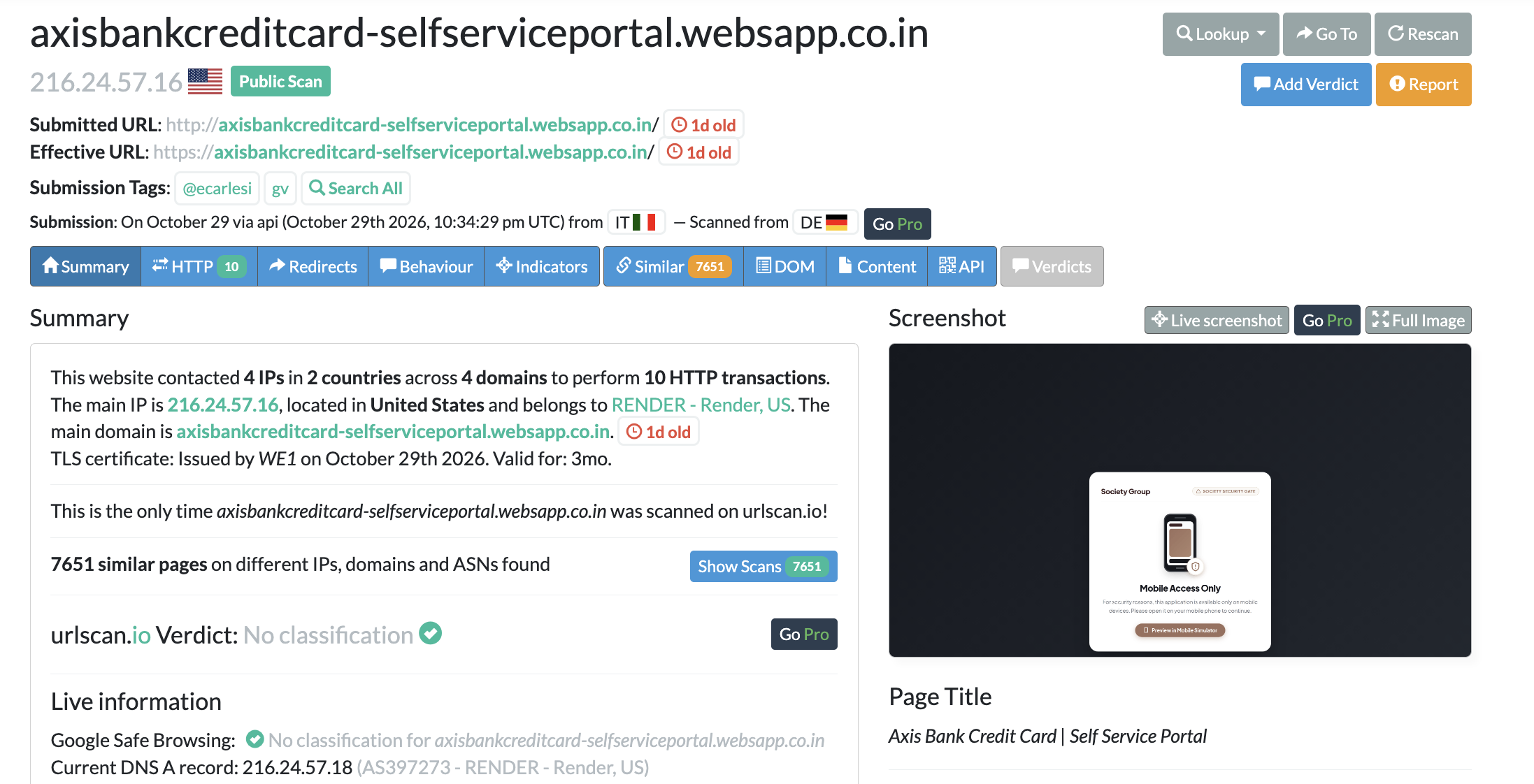 Figure 11: URLScan - Axis new fake portal detail
Since we are dancing, let’s explore the third result (helpcard[.]online/indus/) before concluding this investigation. The page here seems totally different from what we have found so far: it refers to IndusInd Bank, with a reference to Debit Cards.
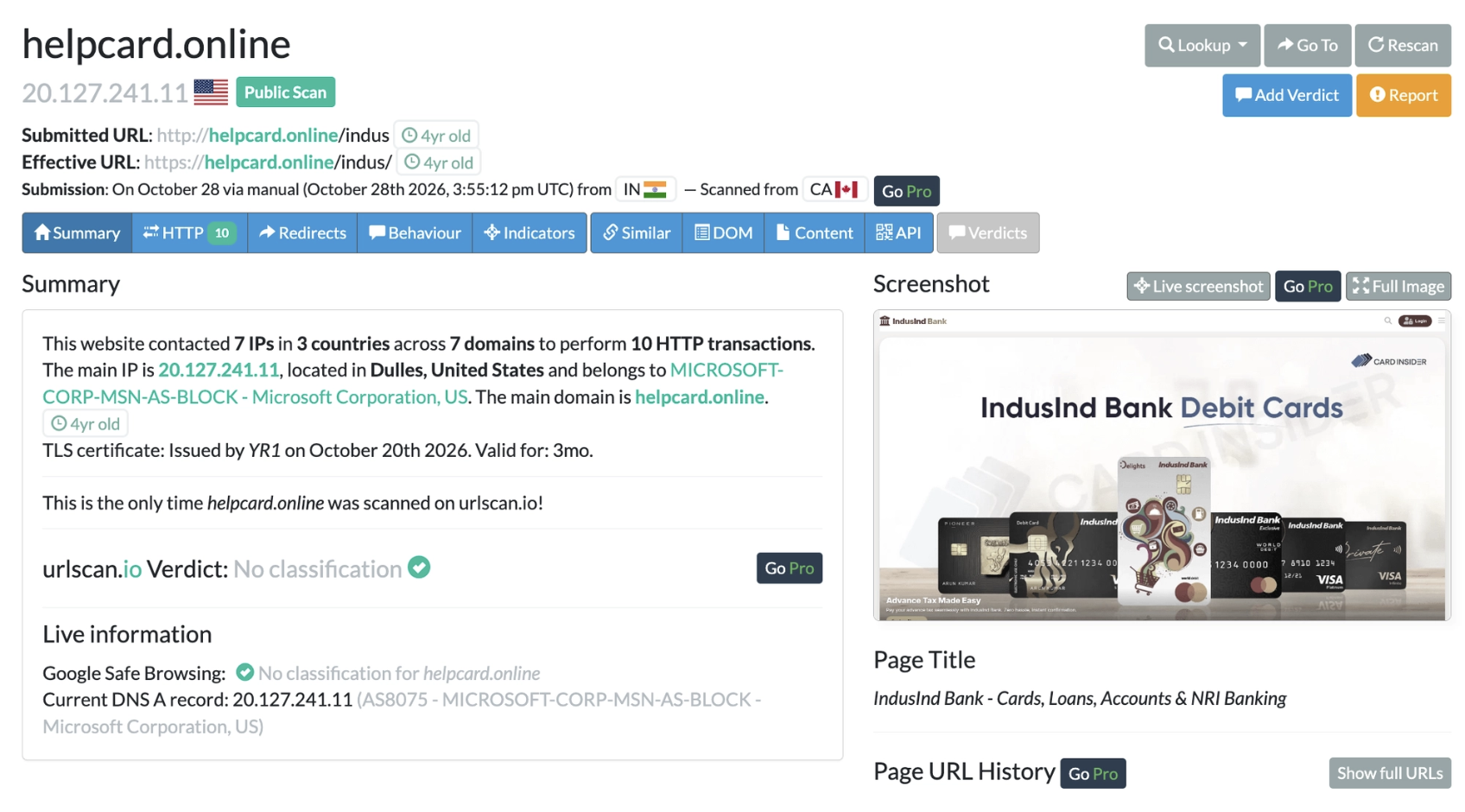 Figure 12: IndusInd discovred fake portal
Exploring the site, we don’t only see the usual welcome page with scammer-like offers: there is also a button that lures users into downloading an Android application. Following that link, through the browser’s developer tab, we can see that it points to a GitHub account.
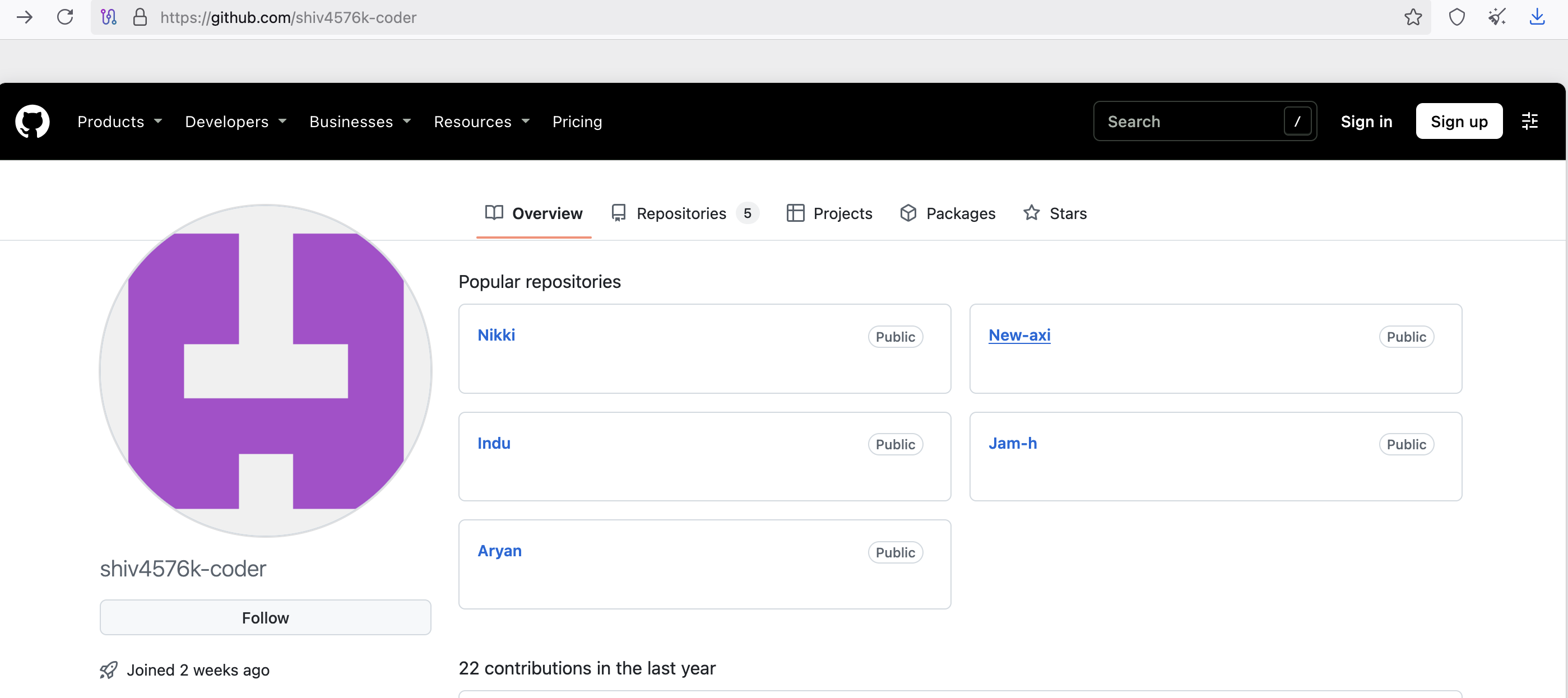 Figure 13: Malicious Github Account
At the time of writing it contains 5 repositories, each of them holding a few different APKs related to different targets.
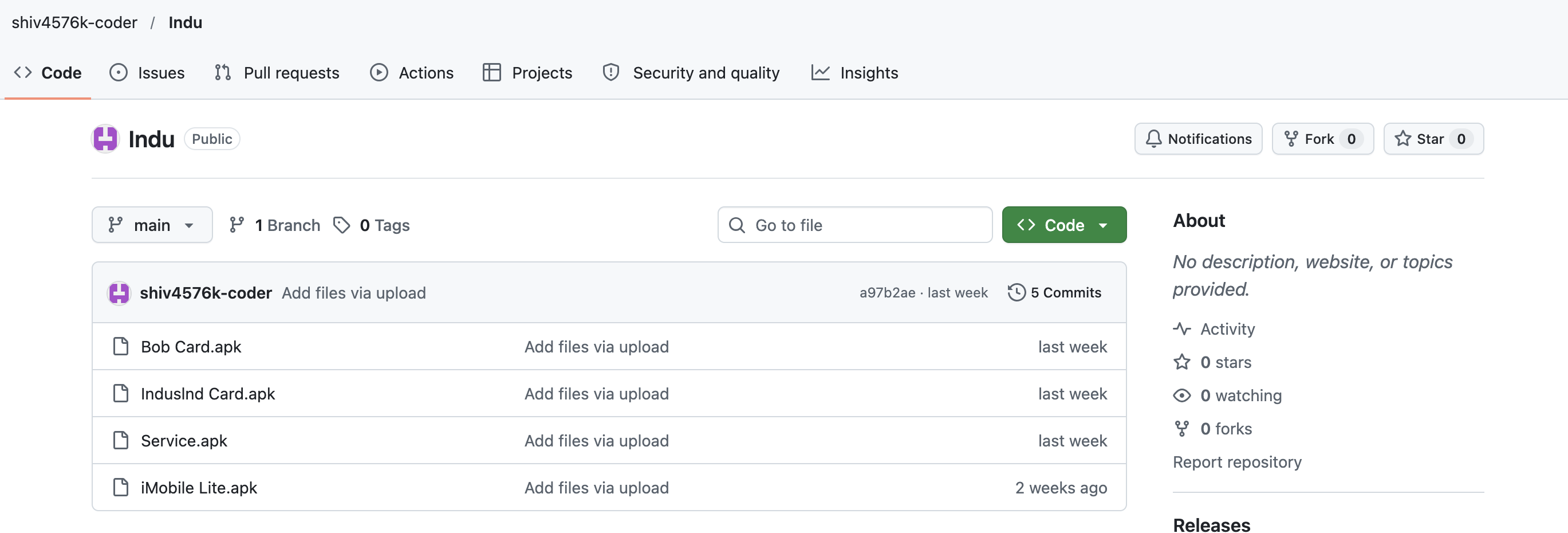 Figure 14: Malicious Git Repositories
Given this pattern, the real next step was to “fuzz” the domain a little, to discover other paths (if any) where those applications could be hosted. Interestingly enough, going to the root of helpcard[.]online, the domain redirects to another HTML page that contains a reference to the New-axi repository.
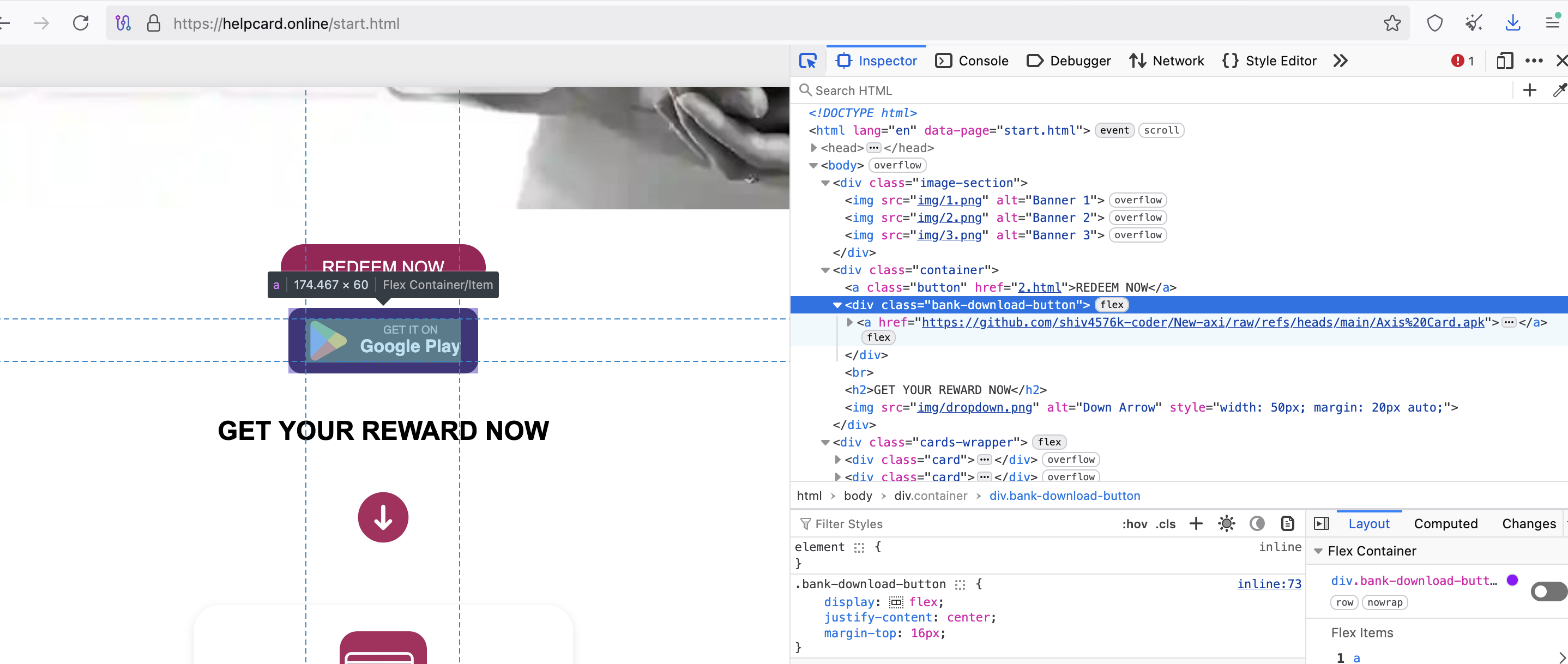 Figure 15: APK download Button
💡This is exactly what approaching the hunt with the attacker’s mind looks like. The names we discovered originally led to a GitHub account that points to a dedicated repository, so the very next question that came to my mind was: “Is there any other pattern on this host that could serve other APKs?” Thanks to that I managed to go the extra mile and discover something new. Even if I already had all the APKs, it was still worth exploring a bit more: you never know what you are going to bump into.
How Do I Know When It’s Time to Stop?
This is exactly the point where things start getting messy. From a single report, without any paid tools, we collected related domains and built a hunting query that not only discovered additional phishing kits, but also unveiled a GitHub account that is actively distributing APKs.
At this point we have collected a lot of information, and the latest discovery lets us keep pivoting, extending our queries with the newest findings. That is a good strategy, but at some point it is worth pausing to make sense of what has been found and documented, because additional material can become overwhelming and tear everything apart.
There is no single right answer. A good compromise is to keep the pivot strategies running, in case something new comes up, and in the meantime start analyzing the APKs to classify them: those are evidence too, and they can feed another round on the merry-go-round.
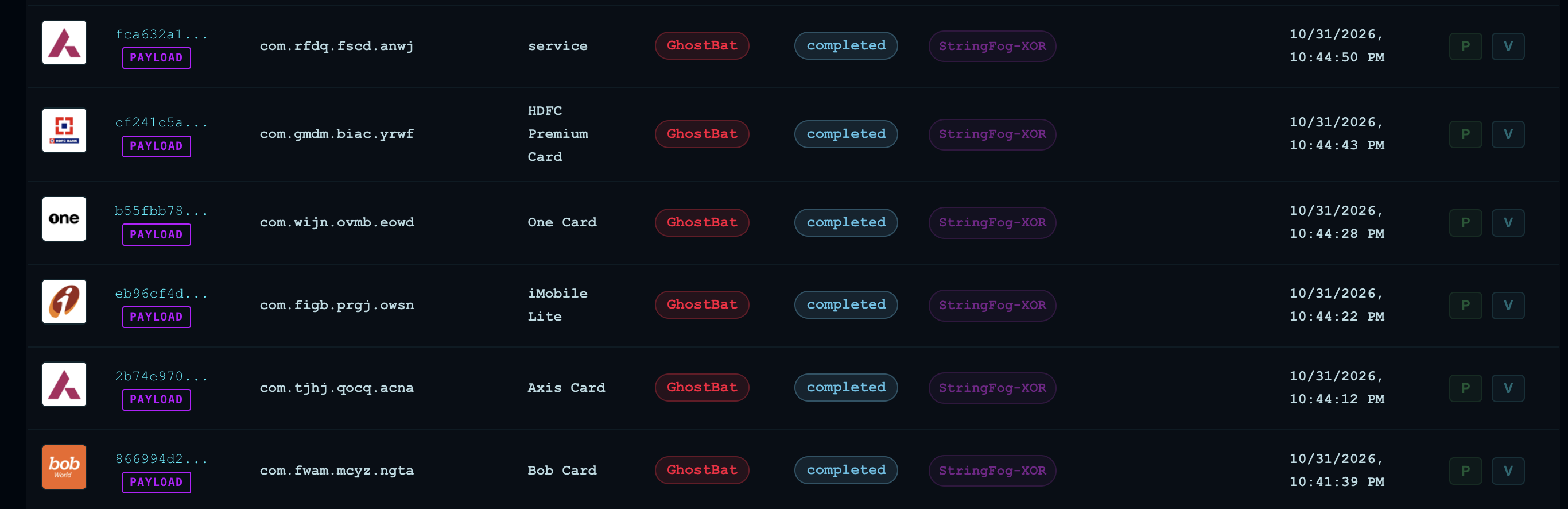 Figure 16: Ghostbat Detected
Conclusion
We started this journey from a single public report and a simple question: can a single researcher keep up with these guys without an expensive intelligence platform?
Here is what we did along the way. We extracted the naming conventions and TLDs from the Group-IB IOCs and scored them by frequency. A series of pivoting led us to fresh phishing kits impersonating ICICI, Axis and IndusInd, hosted on free-tier services and only a day old. Finally, one button on a fake bank page took us to a GitHub account distributing APKs from the GhostBat family. All of it with a free URLScan account, a VirusTotal lookup and a browser.
Of course, paid platforms offer more history, more telemetry and more automation (as you may have noticed, the free tier only lets us search the last 365 days of scans). But that is not what made the difference here. What made the difference was the approach: start from what you have, think like the attacker, and keep asking “what else would they have reused?” Attackers recycle logos, page titles, naming conventions and hosting providers, and every one of those habits is a pivot waiting to be used.
💡Budget limits what you can see, but it does not limit how you can think. A curious researcher with free tools can still find infrastructure before the alerts do, and every domain reported or taken down is one less trap for a real victim. So if you have ever felt that this game is only for those with deep pockets, my advice is: pick an IOC, open a free tool and start pulling the thread. You may be surprised by where it leads.
Happy hunting! 🔍
IOCs
Discovered domains
icicicardplan[.]online
icicicardplans[.]online
icicicardpolicy[.]online
icicicards[.]online
icicicpp[.]online
icicicreditcard[.]online
iciciinsurance[.]online
icicimanagecards[.]online
icicipolicy[.]online
cancelcppservice[.]online
icicideactivatepolicy[.]online
helpcard[.]online
Malicious Github account
shiv4576k-coder
APKs
//All APKs belong to GhostBat family.
1c863864ad556de1a70e69f78edce3a106af7c8ec29d01331493cadc20a6fcd9
2192fbd1385b0804b07e339039fa6aecb684405c59c0eb83c01406835a5a43bd
2daaff68aa9abf87496db1aaf1f888d7a5daf036a3497cda90122c9a3b521045
5da2ebd0915f5ce692dd6dabfbce0a1952ef6085f3d2c9233a189176acf6d71a
8bdf4067550e28c0148a34f0cc29a2cc47140aec89d4e6437205e318e023c720
8d21b3309296b0d5b2fe05ad6390a2ad2b14f932ed4dbaa7cd456b6377b3529f
bbb6c46b1f1a8d45f3edfd9f5caca712109b4adf5c01ae8baad9e9cdeca01d34
df94e0196c2d15148fa9b80a84672401393abda12a433ad0e4372f00f27476cc
f714d65bb847fc58514d34a4a00974cd7cb996112fc1277b408607c9d8835a94
f7c25dfe6e2fb5b55e7985f294955c3201184f26bb10f77d0672ecefcf0791ea
References
Recommended reading:
Group-IB Blog:
2107 Words
2026-11-02 01:00